
Editor’s Note: This post has been revised and updated to reflect current features and opinions.
If you’re a writer, blogger, artist, or other creative trying to guide your audience from your social media account to view your actual work, you’re probably looking into a few of those “link in bio” tools. I did, too. Some felt bloated with unnecessary options for my needs. Others felt too basic to really make it feel like part of my brand. Then I came across Unfold by Squarespace.
Unfold is a sleek, mobile-first tool designed to help creators build simple bio sites. And it comes from the same folks behind Squarespace (the website builder and CMS I use for my business helping creatives with their websites). That sets a strong expectation for design polish and brand trust, but… is it actually worth using in 2025?
Please note: This is my honest opinion based on my user experience with the free tier of Unfold. I received no compensation for writing this, nor was I asked by any entity to share my experience with this.
Quick Navigation
- What is a link in bio site?
- What is Unfold by Squarespace?
- Why I Tried It
- My Favorite Features
- Pros of Using Unfold
- Cons of Using Unfold
- What’s New in 2025?
- Final Thoughts on Unfold’s Bio Site
- I’d Love to Know Your Thoughts
What is a link in bio site?
A link in bio site is a mini mobile-friendly landing page. You can share multiple relevant links to key destinations for your brand. It’s handy on social media platforms like Instagram, which don’t allow clickable links in post captions.
This can feel very limiting if you’re trying to make it easy for your followers to get to certain key URLs as you build your audience. When you have multiple pages you want to direct people to—a website, blog, new product page, Patreon, other social media accounts, affiliates, etc.—how do you pick which one to use?
A link in bio site gives you a single URL to put in your bio and gives your followers access to a centralized list to navigate from.
Link in bio tools
There are a lot out there. Sprout Social has SproutLink available for those with a paid plan. Feedlink, Lnk.Bio, and Linktree are a few others with free versions with additional features available behind a paywall.
What is Unfold by Squarespace?
Unfold is a link-in-bio and storytelling tool developed by Squarespace. Originally launched an app for creating social media templates, Unfold has since evolved into a bio site builder.
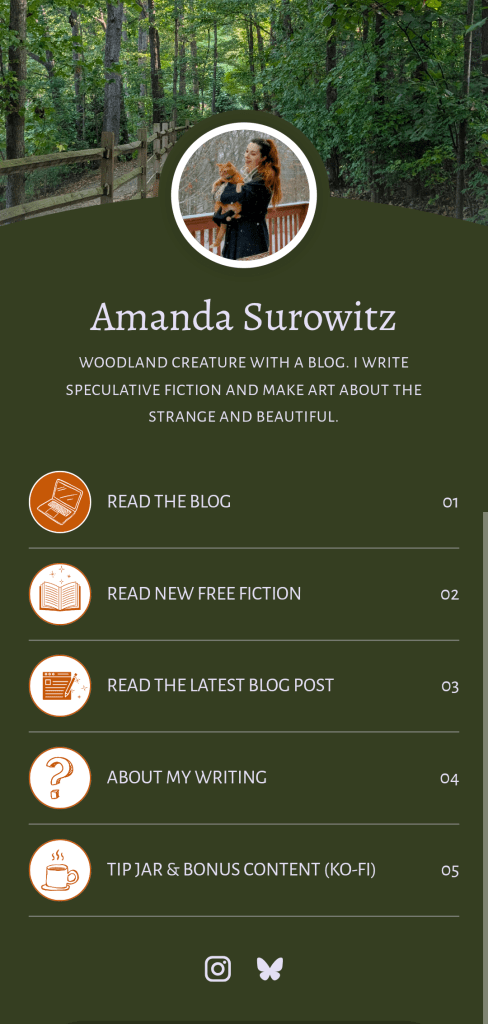
Unlike third-party tools like Linktree or Lnk.Bio, Unfold is tightly integrated into the Squarespace ecosystem. This makes it appealing for people who already use Squarespace for their website or portfolio. You can build a minimalist bio page, customize the design with modern fonts and layouts, and track some basic analytics all from your phone or desktop.
Who it’s for: Unfold is aimed at creators, freelancers, influencers, and small brands who want a visually polished, no-fuss link hub to share on social platforms.
Unfold’s biggest selling point is its clean design aesthetic. That minimalism is great if you don’t want a million widgets or settings that distract from where you want people to go. But it might feel limiting if you need more robust features.
Why I Tried It
As a creative writer, I wanted a simple way to direct people from my social channels to my writing. Visual platforms like Instagram can be tricky for writers to show our work to potential readers. A simple URL in my bio wasn’t enough to tell people what to expect to find on my website: blog posts, essays on creativity, writing updates, and my fiction.
That’s when I started looking at Squarespace’s in-house tool for building stylish bio sites. Since I was already familiar with Squarespace’s clean and powerful design capabilities due to my other website, it made sense to give Unfold a try. While I felt a little disappointed by the limitations back when I first set up my bio site in 2022, I’ve actually been using it for the last few years. And I honestly haven’t thought about switching to one of the alternatives.
In the video below, you can see a sped-up look at some of the features Unfold offers, including some of the Bio Site templates and integrations.
My Favorite Features
My favorite feature has to be that you’re not limited to having only one bio site. If you have more than one brand or account with different social media handles on the same platforms, you can create separate bio sites for each and monitor their analytics individually. I have one that I use for my personal brand as a creative writer and another I use for my business brand that offers website mentorships.
I also love that you can embed an email signup field directly into your Bio Site—even with the free version.
One of the first digital marketing tips I learned was that people are more likely to take an action if they don’t have to complete too many steps to do it. Having the option to let your social media followers sign up to your email list at the first link they clicked, rather than sending them to a second link and then letting them sign up, reduces the number of people who will drop off partway through the journey.
I also like that you can add in a text box, which offers you more characters than the bio section, various social media icon links, and embedded content from other platforms.
Pros of Using Unfold
There’s a lot to like about Unfold, especially if giving your bio site a branded design is a priority for you.
Sleek Design Templates
When you go to choose a template to start building with, Unfold gives you an impressive 14 options. That said, they aren’t 14 unique templates. Some of the template options use the same design base, but with differently styled sections. It doesn’t feel like you’re being cheated, though. It just makes it easier to see the versatility each template offers.
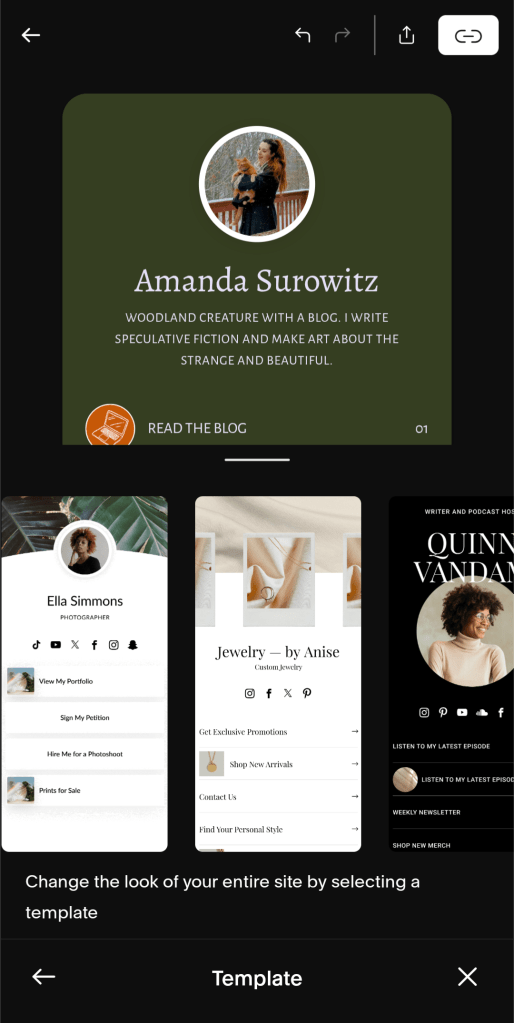
Each template offers customizable visual elements, including a profile image or logo, cover image, and background color. Unlike when I first tried using Unfold, you can now choose from several different fonts and pre-packaged font combinations (if you’re the sort who knows how to smartly combine serif and sans-serif fonts).
You can also create a custom color palette with your brand colors, but that feature is only available on a paid plan.
Built-in Integration with Squarespace
One of Unfold’s biggest advantages is that it’s built and maintained by Squarespace, which makes integration with their website platform smoother than with third-party tools like Linktree or Beacons. If you’re already using Squarespace for your website, blog, or portfolio, Unfold makes it incredibly easy to:
- Pull in your Squarespace site link as a default option and style it consistently.
- Maintain visual consistency across platforms; Unfold uses similar fonts, clean layouts, and design logic that matches Squarespace’s aesthetic.
- Access Unfold from your existing Squarespace account, so there’s no need to manage a separate login.
- No separate Squarespace billing needed if you use Unfold via Bio Sites/a Squarespace account, unlike standalone third-party tools.
- If you publish a Bio Site through Unfold and link it to your Squarespace account, your billing for advanced features can be managed through Squarespace. That means no extra invoices or separate billing tools to juggle. That said, if you subscribe to Unfold Pro via the app, that’s still handled through your app store of choice.
- Use Squarespace analytics alongside Unfold, giving you a unified view of traffic flow from social to Unfold to your full site.
It’s not a deep integration, however. You can’t pull blog posts or product listings into Unfold as of 2025. But it’s still a smoother experience than juggling two separate ecosystems. If you care about brand cohesion, or just want fewer moving parts, that’s a definite plus.
This doesn’t mean Unfold won’t work with websites built with platforms besides Squarespace. You do have to create a Squarespace account in order to use the Bio Site tool, but you can still do so for free and without creating a website with Squarespace. I have a Bio Site built entirely around links to my (this) WordPress site.
Other Integrations and Embeds
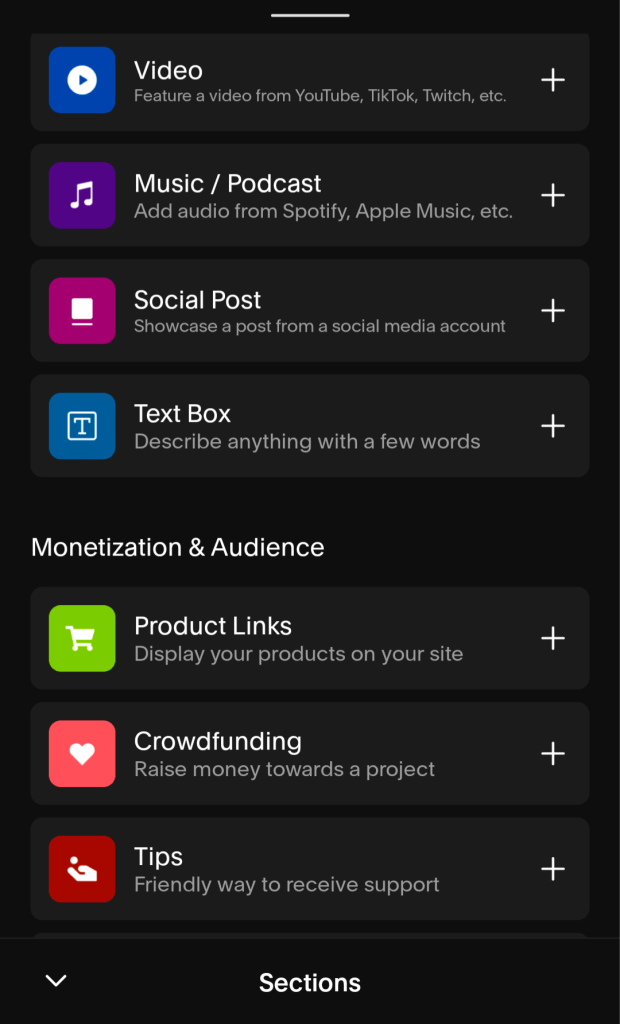
Want to set up a tip jar right in your Bio Site that’s linked to your Patreon? Embed a featured video from YouTube or Twitch? Add music or a podcast episode? How about display your products or offer digital downloads? Unfold offers a lot of integrations with other platforms. This lets you create a mini hub for your online presence that doesn’t feel like a generic list of links. Being able to add more interactive content like audio and video clips makes this an especially attractive option for creatives and small businesses who want to create a richer experience within a microsite.
Mobile-Friendly and Fast Setup
The mobile-first approach doesn’t just apply to making sure the final bio site your visitors see is optimized for mobile devices. The whole user design process is optimized for creating your bio site on your phone. There’s no frustrating back and forth between building a design in desktop view, then correcting everything specifically for mobile view. What you see while you’re editing is what everyone else will see when you publish it. And when you’re ready to do a final check to make sure it looks exactly the way you want, there is a preview mode that lets you view your bio site without the distraction of the customization tools.
The user interface is so simple and intuitive—like what you’d expect from Squarespace—that you can easily have your bio site set up in less than half an hour.
Basic Analytics
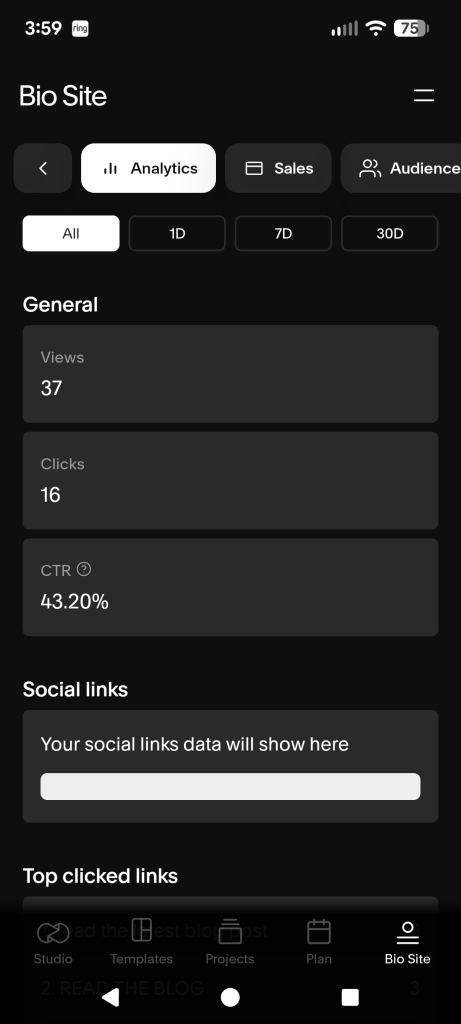
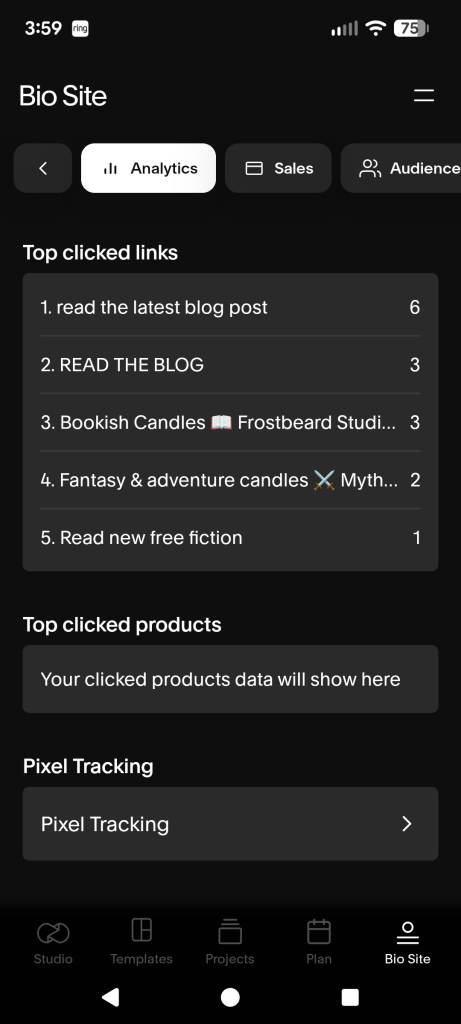
Even the free version gives you access to some analytics data for your bio site. You’ll be able to see how many people viewed your bio site, how many clicks you received, and your overall click through rate (CTR) over the last day, seven days, or 30 days. There’s even a section to tell you what your top 5 most-clicked links are so you can see what people are going for.
This is especially useful if you’re running a social media marketing campaign with posts featuring a call to action (CTA) that directs people to click a link in your bio. You’ll be able to compare data to see if people are clicking where you want them to and what adjustments, if any, you need to make for more conversions.
Free Version Available
Unfold offers a free tier that covers the essentials for setting up a clean, functional bio site with no credit card information required. You can add unlimited links, upload a profile image, and choose a template that works well on both mobile and desktop.
For a lot of creators, especially those just starting out, that’s more than enough to let you do everything you really need:
- Create a minimalist landing page.
- Direct followers and visitors to your key content.
- Do all of that with no ads or branding from Unfold cluttering the page (beyond a minimal “build your own” prompt at the very bottom).
Cons of Using Unfold
While Unfold is clean and simple, that minimalism comes with some trade-offs. For those looking for more flexibility, integrations, or more customization options, these might be reasons Unfold isn’t the link in bio site tool for you.
Limits on Customization Options
As I mentioned above, there are a few base template designs with different variations. These templates are stylish and attractive, but they’re not nearly as customizable as what you’d get with something like Carrd or Beacons. Fonts, colors, and layouts are controlled within tight parameters. It keeps everything looking polished, but can feel restrictive if you have a strong personal brand or want a unique look. For example, you can pick a pre-packaged font combination to mix serif and sans-serif fonts, but you can’t choose the specific fonts you combine. (This is true for the free version, at least.)
Bare Bones Analytics
The analytics dashboard for your Bio Site is extremely minimal. Views and clicks are pretty much all you get. There’s no insight into traffic sources, geographic data, or time-based trends, which are useful if you’re optimizing your content funnel or testing calls to action. You could have your Bio Site linked across all your social media platforms, but—as far as I can tell—you wouldn’t be able to see which platforms your views are coming from. If you’re new to using analytics to inform your strategies, it’s not much to start learning from. unlike Linktree’s paid plans, there’s no A/B testing or advanced analytics built-in.
What’s New in 2025?
Since I made my original review in 2022, a lot has changed with Unfold. A lot of the features that used to be hidden behind paywalls are now included in the free tier. There’s another notable change in usability since my last review, in which I had the following complaint:
The main source of my frustration with Unfold has to be the cover image feature. Each template displays the cover image in different dimensions. One of them uses a portrait crop rather than landscape. But when you select a cover photo, it only shows you a landscape crop.
From my review based on my experience in 2022
I’m happy to say they’ve improved the experience for choosing your cover image. You now have a free-control cropping tool, which greatly reduces frustration. However, this particular feature still has room for improvement.
- It would be nice if the UI for cropping your cover image had an overlay with the rest of your page’s design. I’d like a live preview of how the image will look in the final layout while I’m deciding where to crop it. This would be especially useful with the templates that transform the bottom edge of the cover image into a curve, thus hiding some of the image you wanted visible.
- After you’ve already selected and cropped your cover image, it’s a little strange that selecting the option to edit your cover image takes you to your camera roll to upload a new image. Why isn’t there an intermediary prompt asking if you’d like to edit the current image or select a new one? It’s annoying to have to reselect your image every time you just want to adjust the crop because it displays differently than what the crop UI showed.
Final Thoughts on Unfold’s Bio Site
I’ve now been using Unfold for my Bio Site for three years. I still enjoy the design capabilities that give me more freedom than a basic list of links. Since I’ve recently started trying to get more of my Instagram followers interested in reading my blog, I had to revamp one of my Bio Sites.
Already, I’ve noticed some promising results. The combination of building specific landing pages on my site, adding direct links to those pages to my Bio Site with clear CTAs like “read my latest fiction,” and making regular posts that direct people to visit the link in my bio has generated regular traffic from Instagram.
For me, there’s no need or desire to look at an alternative. Unfold is doing exactly what I need it to with minimal frustration.
I’d Love to Know Your Thoughts
Which link in bio tools have you tried? What have you liked or not liked about them? Is Unfold’s Bio Site tool one you’d consider? Let me know in the comments.


 The AJSWITZY Project